
Read on to learn some tips and tricks about some of our primary features.
Quick Search
Use the top search bar to instantly surface nationwide data. Search by:
- Counties, cities, or addresses
- Owner name
- APNs
- Data layers (e.g. infrastructure, zoning, environmental risk)
- Latitude/Longitude
- Saved maps and searches
▶️ See how Quick Search can expand your research capabilities here.
📖 Learn more with this related support article: Use Our Smart Search Bar
Parcel Search
Utilize Parcel Search to find land holdings by owner or entity, search property within segmented areas of data, and more to quickly hone in on what you're looking for with filters such as assessed improvements value or elevation slope percentage. Simply click the Search Bar then click Parcel Search to get started.
📖 Learn more with this related support article: Use Advanced Parcel Search
Right-Click Shortcuts
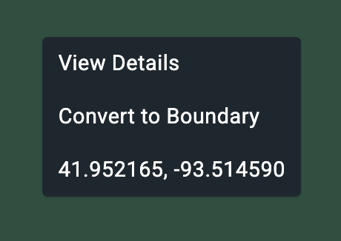
When analyzing a parcel, you can right-click to access three major shortcuts:
- View Details: Instantly see acreage, owner names, assessed value, and much more
- Convert to Boundary: Save the parcel and add it to your selections for later
- Copy Coordinates: Grab latitude and longitude to your clipboard in one click
Using Layers to Create Searchable Boundaries
You can create searchable boundaries from data layers in Acres to:
- Pinpoint off-market opportunities
- Search for comparable sales
- Curate a highly-targeted prospecting list
▶️ Learn how with this short tutorial video.
📖 Learn more with this related support article: Search Within a Layer
Parcel-Level Insights
Use the Insights tab on the left-hand menu to overlay insights on any parcel or selection. The insights feature allows you to visualize:
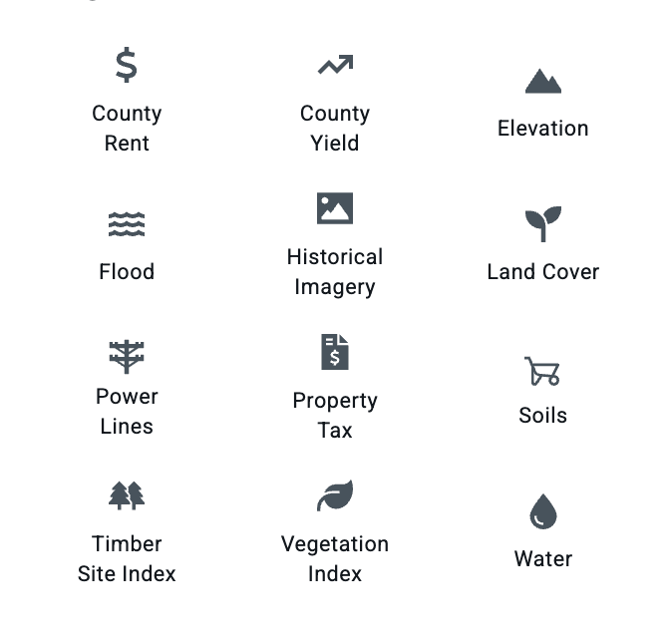
📖 Learn more with these related support articles: Insights. Elevation. Flood and Wetlands. Historical Imagery. Soils. Land Cover. Vegetation Index. Timber Site Index.
Lead Lists
You can search by ownership information and transaction data to visualize holdings, identify opportunities, build marketing and outreach lists, qualify potential customers, and build targeted lead lists.
▶️ See how in this short tutorial.
📖 Learn more with this related support article: Build and Export a Lead List
Custom Mapping
Build shareable, custom maps in Acres to showcase properties and plan projects with a complete set of tools.
- Mark up maps with points, photos, text, and more
- Draw boundaries
- Send direct links and embed interactive maps on websites
- Download and print your custom maps
▶️ See what mapping tools are available to you here.
📖 Learn more with these related support articles: Custom Map Tools
Report Creation
You can generate reports in Acres to create and share information about a property with colleagues and clients.
- Create reports from your saved maps
- Customize your report with historical imagery, comparable sales, topography information, and more
- Include comparable sales and estimated value
- Add your company’s logo and name on your report
▶️ See how you can create a shareable, custom property report with this short tutorial.
📖 Learn more with this related support article: Reports & Sharing
DeedAI
DeedAI automates data entry, and Acres' easy-to-use deed plotting tools help you fine tune the boundaries on the map. Instantly plot PLSS-based Metes and Bounds Descriptions with DeedAI.
📖 Learn more with this related support article: Instantly Plot a Deed with DeedAI
Mobile App Features
With Acres’ mobile app, you have:
- Geotagging: Drop points anywhere on your map to mark notable features like infrastructure, fences, buildings, and more.
- Upload Photos: Add photos to points on the map.
- Route Tracking: Record paths to visualize trails, boundaries, and coverage.
- Directions: Get driving directions to any point or share your coordinates for any location.
- Syncing: Sync your work between desktop and mobile to streamline your workflow.
▶️ See the mobile app in action.
Download for free on the Apple App Store or Google Play