
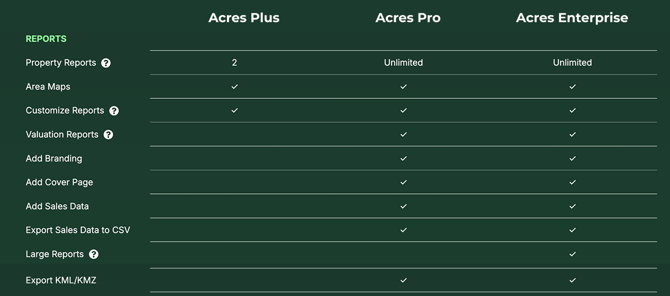
Note: Your access to our exporting options depends on your subscription tier. Compare plans here and choose a subscription that works for you and your needs.
Types of Reports, Exports, and Sharing Options
Share Map (Links)
- Copy Map Link
Copy an interactive Map shareable for anyone — whether they are on Acres or not.
- Copy Selections Link
Copy a link to share with users who have an Acres account.
- Website Embed Options
View more options for sharing a Map Link or creating a custom embedded map.
Reports (PDF)
- Property Report
Generate a professionally designed PDF report for selected parcels including customizable land insights. (This can also include a section for Comparable Sales.)
Learn more: Create a Custom Property Report - Sales Report
Generate a quick comps summary or detailed CMA report for selected Sold Land.
Learn more: Create a Sales Report for Your Comps - Aerial Map
Create a customizable single page aerial map.
Learn more: Create an Aerial Map - Legacy Reports
The previous type of our reports before our latest update, only available for a limited time.
Downloads
- Lead List
Download a list of land owners, buyers, or mortgages.
Learn more: Build and Export a Lead List - CSV
Download parcel data or sales data straight to a spreadsheet.
Learn more: Export Parcel Data to CSV, Export Sales Data to CSV - KML
Export selections to KML file for shape data.
Learn more: Export a KML from Acres
Access Reports, Exports, and Sharing Options
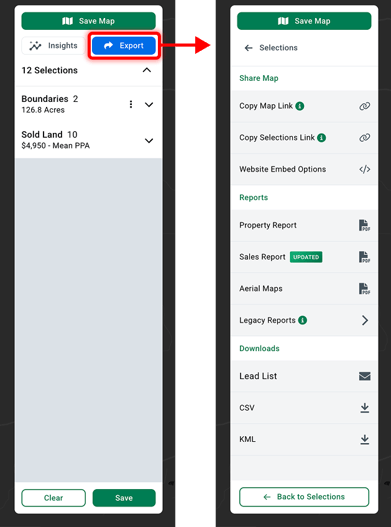
The best way to pull up your Export options is to click on the blue Export button* at the top right of the screen, on your Selections panel.
*The Export button will be white if your selections panel is empty.
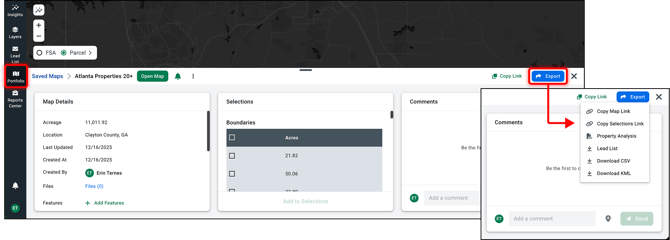
Alternatively, you can click the blue Export button within your Portfolio. Click Portfolio on the left-hand navigation menu. Click on the name of a saved map to open the preview window. Then click Export on the top right.
To access the reports you’ve run, go to your Reports Center at the bottom of your left-hand navigation menu. Reports will also either be emailed to you when complete or downloaded to your computer automatically. Learn more: Access Your Reports
Exporting Limitations
Property Reports
Property Reports are limited to paid subscribers. Acres Plus users get 2 property reports, while Acres Pro and Acres Enterprise users get unlimited access.
Property reports cannot exceed 10,000 GIS acres or 50 selections. For Enterprise users, however, Large Property Reports are available. Acres excludes insight layers so your report generates faster.
CSV/KML Downloads
Exporting parcel data is available for Acres Pro and Acres Enterprise customers only.
How many parcel boundaries can be added to selections? → Unlimited
How many parcels can be exported to CSV/KML? → 200
Exporting sales data is available for Acres Pro and Acres Enterprise customers only.
How many sales can be added to selections? → 30
How many sales can be exported to CSV/KML? → 30