
Note: Access to sales data requires an Acres Pro or Acres Enterprise subscription. Click here to compare our plans and upgrade your plan.
Find high-quality, highly relevant, and recent sales data nationwide, even in non-disclosure states.
To access this information follow these quick steps or watch the tutorial video below.
Quick Steps
- Log in to your Acres Pro or Acres Enterprise account
- Click Sold Land on the left-hand navigation menu.
- Adjust your results by zooming/panning the map and/or by using filters.
- Identify desired comps then add them to your selections panel to save to your portfolio or to run a Sales Report.
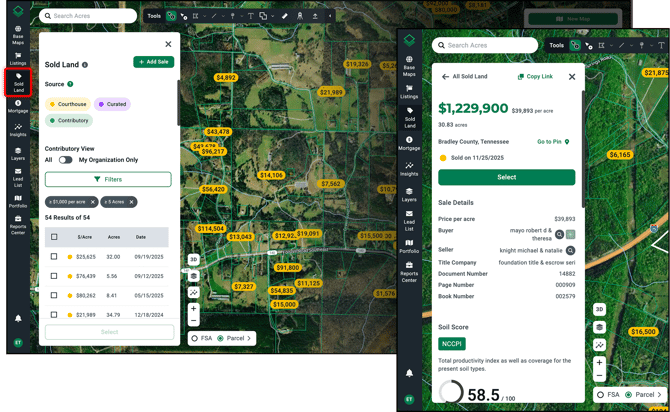
Note: Sold Land is not available on our mobile app at this point.
Tutorial Video
0:00 Intro
0:18 Sold Land Features
0:59 Add Your Own Sales
1:12 Filtering Sales
2:13 Adding Sales Selections
2:36 Save to Your Portfolio
2:47 Generating Reports
3:17: Extra Support