
What is Skip Tracing in Acres?
Skip Tracing provides potential contact information for parcel owners directly within Acres. This includes up to three phone numbers and three email addresses per owner, sourced from best-in-class national data providers.
Because skip tracing data is inherently imperfect across the industry, Acres intentionally shows multiple possible contacts to increase the likelihood that at least one is correct.
In our internal testing:
- 58–70% of owners had at least one correct phone or email
- Phone numbers tend to be more reliable than email addresses
- Data is based on USPS-verified addresses, which can make rural records less accurate
Where to Find Skip Tracing
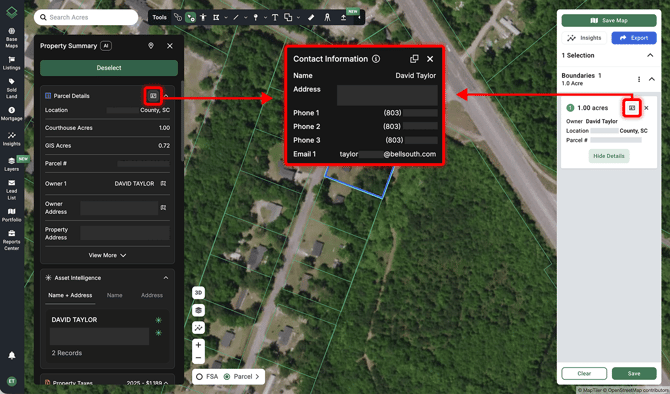
Skip Tracing is available in three places:
- Parcel Details in the Property Summary
- Parcel cards in the Selections panel when parcels are selected
- Parcel Details pop-ups in the Asset Intelligence graph
How to Use It
- Open Parcel Details in any of the locations above
- Review up to three phone numbers and three email addresses
- Use the Copy button to copy the data
- Paste directly into Excel or Google Sheets — it will automatically format into two clean columns for outreach workflows
Important Expectations
Skip tracing is never perfectly accurate — with any provider.
You may see:
- Multiple outdated numbers
- Emails that are no longer in use
- Mixed results in rural areas
This is expected behavior across the industry. Acres intentionally errs on the side of inclusion to give you the best chance of reaching the correct contact.
We vetted more than 8 providers and selected the one with the highest match rates.