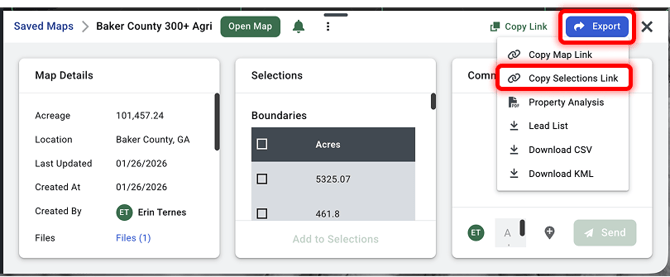
To share all selected boundaries and/or selected sales with other Acres users, you can Copy Selections Link.
You can do this through the Selections Panel or the Portfolio. See steps below.
Doing this is a great way to share selections with another Acres user, whether it's someone on another team or with the Acres Client Support Team for troubleshooting specific issues.
Included in the link:
• Boundaries
• Boundary Customizations (names, notes, colors)
• Sold Land
Not included in the link:
• Drawings
• Listings
• Mortgages
Steps: Selections Panel Export
-
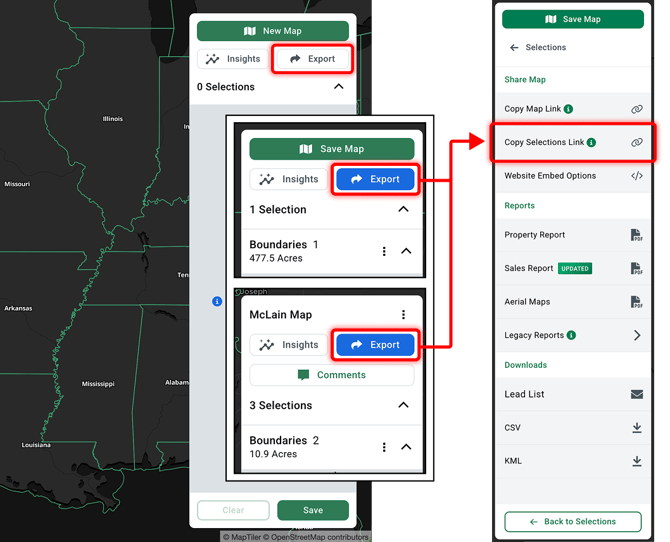
Click the Export button on the top right of your right-hand selections panel
-
Click Copy Selections Link toward the top
Steps: Portfolio Export
-
Open your Portfolio
-
Click on the name of a saved map to open the preview window
-
Click Export on the top right of that window
-
Click Copy Selections Link toward the top