
NOTE: Acres' FSA boundaries are from 2008, the most recent of publicly available data. Our FSA layer can be a helpful starting point, but finding true tillable acreage requires understanding how to read the map and can be supported with the use of our other insights and custom map tools.
Viewing FSA boundaries allows you to see individual, contiguous farming parcels (or CLUs — Common Land Units).
The shortcut to view FSA boundaries can be found at the bottom left of the screen (see image below).
Courthouse boundaries ("Parcel") are shown by default. To switch to CLU boundaries ("FSA") simply select FSA.
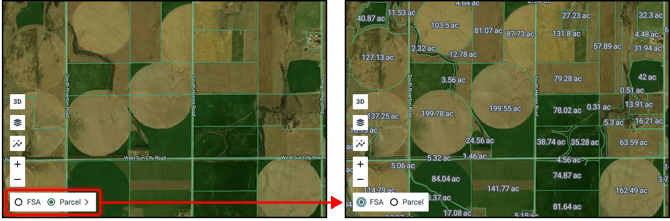
Alternatively, you can select Base Maps on the left hand main menu then select FSA.
TIP: To remove the FSA / Parcel / Owner Name shortcut from your main map, go to Base Maps, then click the pin icon next to "Pin to Map".
FSA boundaries can be added to your selections and act like a custom boundary. To add an FSA parcel to your Selections Panel, be sure to have the white Quick Select Cursor selected, then simply click on the desired property. Learn more about making selections and different boundaries here.
Suggestions for finding tillable acreage:
-
Turn on FSA boundaries
-
Review Land Cover Insights
-
Review Historical Imagery Insights
-
Create custom shapes to find the acreage